 Semantic portal
Flowcharts
Domains:
Java Basics
A flowchart is a visual representation of a process, workflow, or system. It uses standardized symbols to illustrate steps and decisions within a sequence, making it an effective tool for understanding, analyzing, and improving processes.
Why Use Flowcharts?
Flowcharts simplify complex processes by breaking them down into individual steps and presenting them in a clear, structured format. Here are some reasons to use flowcharts:
- Visualization: They help visualize a process, making it easier to understand.
- Problem Solving: Flowcharts assist in identifying bottlenecks, inefficiencies, or redundancies in processes.
- Documentation: They serve as a great documentation tool for complex systems, useful for training, troubleshooting, and maintaining consistency.
- Communication: A well-designed flowchart can communicate the logic or structure of a process to different stakeholders, regardless of their technical background.
- Improvement: By mapping out the steps of a process, flowcharts can reveal opportunities for streamlining or automation
Key Components of Flowcharts
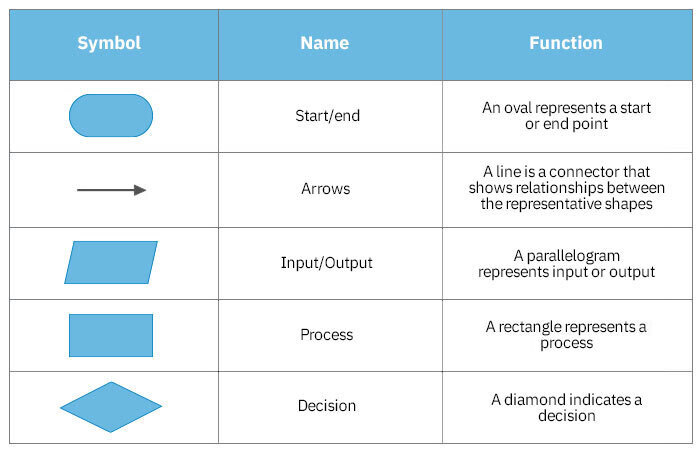
Flowcharts consist of various symbols that represent different types of actions or decisions. Here are the most common ones:
- Oval (Start/End): Marks the beginning or end of the process.
- Rectangle (Process/Action): Represents a specific action, task, or process step.
- Diamond (Decision): Denotes a decision point where the process branches based on a yes/no question or condition.
- Arrow (Flow Line): Shows the direction of the flow, indicating the sequence of steps.
- Parallelogram (Input/Output): Represents input from a user or system, or output to be delivered (e.g., data input, displaying information).
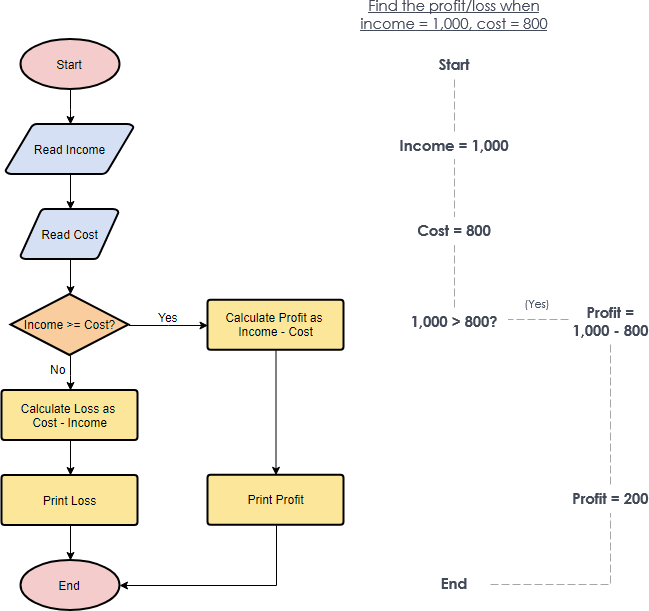
Flowchart example
This algorithm checks whether a business made a profit or incurred a loss by comparing the income to the cost.
Algorithm: Calculate Profit or Loss
- Start
- Input
Income - Input
Cost - Check if
Income >= Cost- If Yes, calculate
Profit = Income - Cost - If No, calculate
Loss = Cost - Income
- If Yes, calculate
- If profit was calculated, print the profit.
- If loss was calculated, print the loss.
- End
Java code:
import java.util.Scanner;

public class ProfitLossCalculator {
    public static void main(String[] args) {
        Scanner scanner = new Scanner(System.in);

        System.out.print("Enter Income: ");
        double income = scanner.nextDouble();

        System.out.print("Enter Cost: ");
        double cost = scanner.nextDouble();

        if (income >= cost) {
            double profit = income - cost;
            System.out.println("Profit: " + profit);
        } else {
            double loss = cost - income;
            System.out.println("Loss: " + loss);
        }

        scanner.close();
    }
}